

forms collection; anyone with the link fills it in. Each response is a normal record in that collection, checked by its fields, validation, access and hooks.
The collection stays config. A form only picks which of its fields to ask for, with what wording, in which order and steps, and when it closes. A new question means a new field in config.
Install
Building a form
Admins build forms on theforms edit page. The Questions tab is a builder:
- Add question lists the fields of the form’s collection that a question can use, with their type and a required mark. It greys out the fields it can’t use, with the reason, and hides the ones already on the form.
- A missing required field shows a warning. A field that is
requiredwith nodefaultValueand isn’t on the form shows the warning that saving would give. - Edit opens a question to change its label, help text, and placeholder. The field’s own values show as placeholder text.
- Add step splits the form into steps. A step that still has questions asks before it’s removed.
- Move a question by dragging its handle. With the keyboard, focus the handle and press Space, the arrow keys, and Space. A question moves within or across steps.
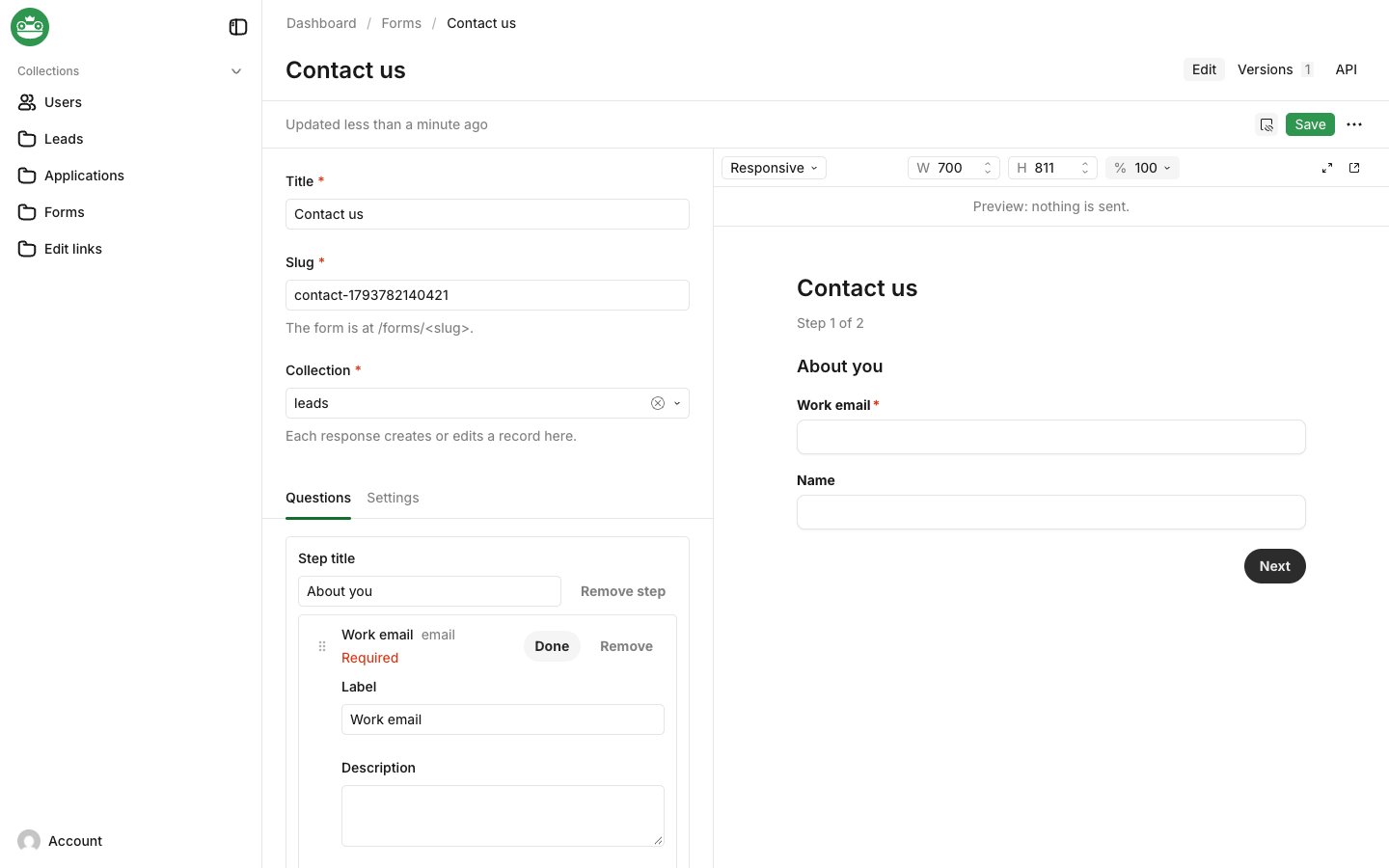
- Phone in its toolbar shows the form at 390 px wide.
- Nothing is sent from the preview. Its last step shows the confirmation.
- Live Preview is off on a new document, so a new form shows it after its first save.
- The preview is the admin page
/forms-preview, which only users who can create or update forms can open.
forms collection has:
title, and a uniqueslugof lowercase letters, numbers and hyphens.collection: one of the listed collections. Each response creates a record there.mode:create(the default) takes new records,updateedits one record through an edit link, andbothdoes either.steps, each with an optionaltitleand itsquestions. A question names a field of the collection and can override itslabel,descriptionandplaceholder. A file question also hasmaxFileSize,maxFilesandmimeTypes; see File uploads. A question can also haverulesandmatch; see Showing a question for some answers.hiddenParams: URL parameters, likeutm_source, saved to a field of the record.confirmation: amessage, or aredirectto a path such as/thanksor anhttp(s)URL.status(openorclosed),closesAtandmaxResponses.
text, textarea, email, number, select, radio, checkbox, date, or upload. Fields in unnamed rows, collapsibles, groups, and tabs count as top-level.
Saving a form is refused, naming the field at fault, when a question does any of these:
- Uses another field type, a list (
hasManytext or number), or a hidden or virtual field. - Repeats a field already on the form.
- Names a field whose
access.createdenies a form submission. - Asks for files that could pass the app’s upload limits, or stores them somewhere a form can’t (see File uploads).
- Has a rule that checks itself, a later question, a question not on the form or a file question, or has rules on a
requiredfield (see Showing a question for some answers).
required and has no defaultValue, since no response could then be saved.
Two kinds of form skip checks:
- An
updateform skips the missing-required-field rule and theaccess.createcheck, and has its own checks. See Edit links. - A form saved as
closedskips all of these checks, so it can always be closed, or drafted before it opens.
Showing a question for some answers
A question withrules is shown only when the answers to earlier questions pass them. Each rule names an earlier question’s field and an operator:
equals: the answer isvalue. A checkbox answer istrueorfalse, a number compares by value (5equals05), and a multi-select passes when any chosen option isvalue.notEquals: the answer isn’tvalue, which includes no answer.hasValue: the question has an answer. An unchecked checkbox, empty text and no chosen option don’t count.
match: 'any'. In the builder, open a question with Edit and use Show when, which offers the questions above it:
visibleQuestions from @frogbotai/ui/forms/rules, over the answers in order, so the answer to a hidden question counts as no answer for the rules after it. A step whose questions are all hidden is skipped, and the step count leaves it out. Hidden questions aren’t checked on the page, and the server drops their answers and files, even if a client sends them; through an edit link, a hidden question’s field keeps its saved value, and the rules read the record’s saved answer to any earlier question the edit leaves out. Since a hidden question must never block a response, a required field can’t have rules, even one with a default: make it optional. If a field becomes required after a form gave it rules, the page and the server ignore those rules and always show it.
Who can open a form
Like any collection,forms is readable by anyone and writable by signed-in users unless you pass access, which is merged over those defaults. A visitor who can’t read a form gets the same 404 as for a form that doesn’t exist:
How a response passes access
Every listed collection’saccess.create is wrapped as isFormSubmission(req, slug) || yourRule(args). A collection with no create rule keeps FrogBot’s default, admin users only, behind the same check. The record is created with overrideAccess: false, so field access and the collection’s hooks still run.
While the record is created, req.context.form holds { form, collection }. Use isFormSubmission in your own hooks or access to tell responses apart:
req isn’t admitted there.
File uploads
Anupload field makes a file question: visitors attach files, and the record points at them. The files go into an upload collection that you also list in collections, and nobody gets them back: the response holds no file, URL or ID, and the upload collection’s own read rule decides who sees them.
These checks use the type the browser sends. The upload collection then checks the file’s contents: it refuses executables and scripts unless you set
upload.allowRestrictedFileTypes, and with upload.mimeTypes set it also refuses files whose detected type isn’t listed.
Upload limits
Every file arrives in one request, under the app’s upload limits. The defaults are 20 MB per file, 3 files, and 50 MB per request. Saving a form is refused, naming the question, in these cases:- One file could be larger than the per-file limit.
- The form’s file questions together could take more files than one request allows.
- The form’s file questions together could take more bytes, plus 1 MB for the answers, than one request allows.
upload.useTempFiles: true to write them to a temporary folder instead. Your host may cap request bodies too; Vercel, for example, refuses bodies over 4.5 MB.
How files are saved
A submit with files ismultipart/form-data: the usual body as JSON in a _payload part, and each file as a part named after its question. Parts named after anything else are ignored. A value in data for a file question, such as the ID of a file already in the app, answers 400: visitors can attach files, never point at existing ones.
A submit with files runs in this order:
- Each question’s count, size, and types are checked. A required question with no file answers
400. - Each file is created in its upload collection the way the record is: flagged as this form’s submission and with
overrideAccess: false, so its hooks run. - The record is created last.
400 with the error on its question.
Scanning files
FrogBot doesn’t scan files itself. Add abeforeChange hook to the upload collection that scans req.file and throws when it’s unsafe. The file is written to storage only after the collection’s beforeChange hooks, so when the hook throws, nothing is kept. Boot logs a warning for each listed upload collection without a beforeChange hook.
This one uses ClamAV through the clamscan package and a clamd server, which needs about 4 GB of memory:
APIError below 500 reaches the visitor as the question’s error. Any other error answers 500 and is logged.
The form page
Every form has a public page at/forms/<slug> under the admin route, /forms/contact with FrogBot’s default admin at /. It renders without the admin’s sidebar and header, follows the app’s theme, and works for visitors who aren’t signed in. The page loads the form as the visitor, so a form they can’t read, or one that doesn’t exist, shows the not-found page. A closed form shows that it’s closed.
The page reads the form’s hidden parameters from its own URL, so /forms/contact?utm_source=newsletter saves newsletter to the field utm_source maps to. A required question must be answered before Next moves on, and errors from the collection’s validation are shown on their questions.
Rendering a form in your own frontend
The same renderer is a React component in@frogbotai/ui/forms. It imports nothing from FrogBot’s server or Next.js, so it works in any React app. Fetch the definition, then render it against the submit endpoint:
@frogbotai/ui/styles.css once for its styles. They sit in the frogbot cascade layer, so your own CSS overrides them without extra specificity. The form’s root is .fb-form.
Endpoints
Both endpoints are public and check the form’sread access as the visitor.
- Its title, steps, and questions. Each question has
key,type,label,description,placeholder,required,options,hasMany, anddefaultValue. A file question also hasmaxFiles,maxFileSize, andmimeTypes. - The hidden parameter names and the confirmation.
- Whether the form is
closed. - The
honeypotinput’s name and, with Turnstile on,turnstile.siteKey.
- Keys that aren’t questions on the form are dropped, as are undeclared parameters. A declared parameter is cut to 500 characters.
- A form that is closed, past
closesAtor atmaxResponsesanswers410. - On success the response is
{ "confirmation": { "type": "message", "message": "…" } }or{ "confirmation": { "type": "redirect", "url": "/thanks" } }, never the record. - When the collection refuses the record, the response is
400with{ "errors": [{ "field": "email", "message": "…" }] }. - With files, send
multipart/form-dataas described in How files are saved. Files over the app’s upload limits answer413. - A missing or refused Turnstile token answers
400, and too many submits from one address answer429with aRetry-Afterheader. See Spam protection.
?link=<token> for an edit link: the definition then carries the record’s answers as values, and the submit updates that record. An update form answers 404 without a link.
With maxResponses set, responses are counted under a per-form lock in the app’s KV store, so two visitors submitting at once never pass the limit. Without it, the count is kept but not locked.
Edit links
An edit link lets someone without an account change one record through one form. Examples are a customer who fixes their phone number and an applicant who updates their answers.- Set the form’s
modetoupdate, or tobothto keep taking new records too. - Make a link for a record.
Making a link
In the admin, open a record and choose Create edit link from its menu. The item shows when anupdate or both form targets the collection and you can update the record.
- Pick the form, how long the link lasts, and how many saves it allows.
- Copy the URL.
The URL is shown once. Only a hash of it is stored, so a lost link is replaced, not copied again.
createFormLink as the user who sends it:
It returns
{ url, id, expiresAt }.
- Without
overrideAccess, the user must pass the collection’s ownaccess.updatefor that record, or the call throwsForbidden. - A form that only creates, a bad length, or a bad use limit throws
ValidationError.
POST /api/form-links with the same options as JSON makes a link as the signed-in user.
An agent can send links through a tool that calls it as the agent’s user, so the collection’s update rule still decides:
How long links last
Links last 7 days unlessexpiresIn says otherwise, and at most 30 days. Change both in the plugin options:
maxSubmissions: 1 for a single-use link. Opening a link never counts, only saving.
What a link can do
- It opens one form for one record.
/forms/<slug>?link=<token>shows the record’s current answers to the form’s questions and nothing else, read withoverrideAccess: false. - Saving keeps only the form’s questions, ignores URL parameters, and updates the record with
overrideAccess: false. Emptying an answer clears its field. The response is the confirmation or field errors, never the record. - While a link is used, each listed collection’s
access.readandaccess.updateadmit only the link’s record.req.context.formLinkholds{ id, collection, record }, so your hooks can tell link saves apart; only the plugin can set it, and a hook that writes another collection or record with the samereqisn’t admitted there. updatedBystays as it was, since nobody is signed in. The link’ssubmissionsandlastSubmittedAtrecord each save. A save the collection refuses spends no use.- An unknown, expired, revoked or used-up link, or another form’s, shows one “This link is no longer valid” page, and the endpoints answer
410with no detail. WithtrustProxy, each such link counts toward the visitor’s rate limit. - The token is random, not signed, so it never signs anyone in, and changing
FROGBOT_SECRETdoesn’t break links.
update or both form is refused, naming the field, when a question’s access.read or access.update denies a signed-out request, or when it’s a file question. Collections with drafts can’t take edit links.
To fix a value that a person may not change, such as the record’s owner, set it in a beforeChange hook when req.context.formLink is present.
Revoking links
Links live in the Edit links collection (form-links), with each link’s status: active, expired, used up, or revoked.
- Revoke in the admin. View edit links in a record’s menu lists that record’s links. Select some and choose Revoke selected.
- Revoke in code. Setting
revokedAt, or deleting the link, stops it at once. A revoked link stays revoked. - Deleting a form deletes its links.
- Access. People who can update a record can see, revoke, and delete its links.
links.accessoverrides that.
Spam protection
A public form is a public write path, so every submit goes through these checks, in this order:- Rate limit. With
trustProxyon, each visitor address getsrateLimit.maxsubmits perrateLimit.windowseconds across all forms, 10 per 10 minutes by default. The next one answers429before the body is read. Counts live in the app’s KV store. - Honeypot. The page has a hidden input that people never see or reach with the keyboard. A submit that fills it gets the normal confirmation, and nothing is saved or counted.
- Turnstile. With
turnstileset, the page shows Cloudflare’s Turnstile widget and the plugin checks its token with Cloudflare before saving. A missing, invalid, expired or reused token answers400. Tokens last 300 seconds and work once.
Visitor addresses and trustProxy
The server can’t see a visitor’s address on its own; behind a proxy or load balancer, it gets it from the x-forwarded-for header the proxy sets. A visitor can send that header too, so the plugin reads it only when you set trustProxy: true, and then uses its last entry, the one your proxy appended, or x-real-ip when there’s none.
Set trustProxy: true only when every request reaches the app through a proxy that sets those headers, such as Fly.io, Vercel, Cloudflare or nginx with proxy_add_x_forwarded_for. With it off, submits aren’t rate-limited at all, since counting every visitor together would refuse real people on a busy day, and boot logs a warning. The honeypot and Turnstile still run.